Daten & ROI
Live-Ausgabe der echten Render-Engine — ändere die Einstellungen und sie aktualisiert sich sofort.
Sankey-Diagramm
gestaltete motion-karten
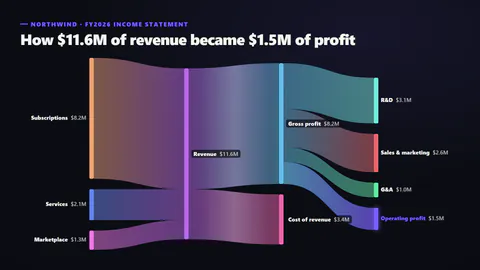
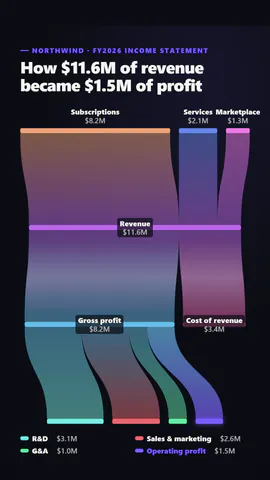
Stufen, verbunden durch Bänder, deren Breite den fließenden Mengen entspricht, Stufe für Stufe von links nach rechts enthüllt (oder auf dem Smartphone von oben nach unten).
Ideal für: Gewinn-und-Verlust-Rechnungen, Budgets, Nutzerreisen und wohin etwas fließt.
Einstellungen
Schrift
Theme
Größe
Stimmung
Formate, die die Bildprüfung bestanden haben
Was du schreibst
titleTitle (≤60)· PflichtlinksThe flows: from one named stage to another, with the amount; stages are placed in columns by how far along they are· PflichthighlightThe stage to make the hero (glows, and in focus mode is the only one in colour) (≤22)· PflichtkickerSmall line above the title (≤40)prefixBefore each amount, like $ (≤3)suffixAfter each amount, like M or % (≤4)decimalsDecimal places (≤2)orientationAuto flows left to right on wide frames and top to bottom on tall onesribbonStyleRibbons blending from one stage's colour to the next, or in the colour they leavepaletteSpectrum: each stage its own colour; focus: all muted but the highlighted stage and its flows
Eine Code-Vorlage: in jedem Tarif kostenlos, ohne KI-Credits.
In einem Film verwenden
Gemacht fürZahlen & Ergebnisse
Was du ändern kannst:
rushie.props.titlerushie.props.linksrushie.props.highlightrushie.props (others)Für Entwickler (MCP und JSON)
Das ist genau die Szene für create_animation (MCP): Struktur behalten, Worte ändern und den Sprechertext schreiben — die Stimme bestimmt, wie lange die Szene dauert. Mit set_data in update_storyboard einfügen, um einen fertigen Film zu ändern.
{
  "visual": "rushie",
  "heading": "Sankey flow",
  "narration": "Write the sentence the voice says over this scene; its length is the scene's.",
  "data": {
    "rushie": {
      "template": "sankey-flow",
      "props": {
        "kicker": "Northwind · FY2026 income statement",
        "title": "How $11.6M of revenue became $1.5M of profit",
        "links": [
          {
            "from": "Subscriptions",
            "to": "Revenue",
            "value": 8.2
          },
          {
            "from": "Services",
            "to": "Revenue",
            "value": 2.1
          },
          {
            "from": "Marketplace",
            "to": "Revenue",
            "value": 1.3
          },
          {
            "from": "Revenue",
            "to": "Gross profit",
            "value": 8.2
          },
          {
            "from": "Revenue",
            "to": "Cost of revenue",
            "value": 3.4
          },
          {
            "from": "Gross profit",
            "to": "R&D",
            "value": 3.1
          },
          {
            "from": "Gross profit",
            "to": "Sales & marketing",
            "value": 2.6
          },
          {
            "from": "Gross profit",
            "to": "G&A",
            "value": 1
          },
          {
            "from": "Gross profit",
            "to": "Operating profit",
            "value": 1.5
          }
        ],
        "prefix": "$",
        "suffix": "M",
        "decimals": 1,
        "highlight": "Operating profit",
        "orientation": "auto",
        "ribbonStyle": "gradient",
        "palette": "spectrum"
      }
    }
  }
}