So funktioniert's
Live-Ausgabe der echten Render-Engine — ändere die Einstellungen und sie aktualisiert sich sofort.
Drei Gründe
gestaltete motion-karten
Eine Karte pro Grund, jede mit einer großen Zahl, die aufspringt.
Ideal für: Warum Teams wechseln.
Einstellungen
Schrift
Theme
Größe
Stimmung
Formate, die die Bildprüfung bestanden haben
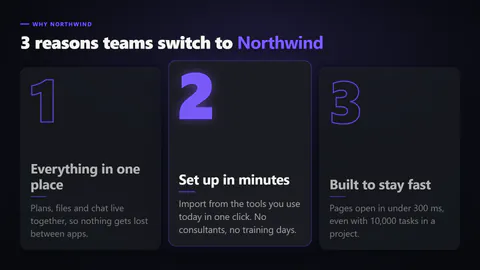
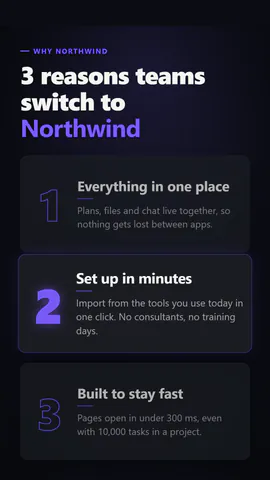
1:1
Was du schreibst
titleThe headline; wrap words in *stars* to colour them, or empty to hide (≤64)· PflichtitemsThe reasons, numbered in order (2 to 4)· PflichtkickerSmall label above the title, or empty to hide (≤32)layoutA card per reason with a big number, or an editorial list with numbers in the marginnumeralsOutlined numbers that fill when their reason is in focus, or solid numbers
Eine Code-Vorlage: in jedem Tarif kostenlos, ohne KI-Credits.
In einem Film verwenden
Was du ändern kannst:
rushie.props.titlerushie.props.itemsrushie.props (others)Für Entwickler (MCP und JSON)
Das ist genau die Szene für create_animation (MCP): Struktur behalten, Worte ändern und den Sprechertext schreiben — die Stimme bestimmt, wie lange die Szene dauert. Mit set_data in update_storyboard einfügen, um einen fertigen Film zu ändern.
{
  "visual": "rushie",
  "heading": "Three reasons",
  "narration": "Write the sentence the voice says over this scene; its length is the scene's.",
  "data": {
    "rushie": {
      "template": "three-reasons",
      "props": {
        "kicker": "Why Northwind",
        "title": "3 reasons teams switch to *PageToVid*",
        "items": [
          {
            "title": "It reads your page",
            "text": "Facts from the page, not filler."
          },
          {
            "title": "It films your site",
            "text": "Real footage in a real browser."
          },
          {
            "title": "It speaks four languages",
            "text": "Voice and captions in each."
          }
        ],
        "layout": "cards",
        "numerals": "outline"
      }
    }
  }
}