So funktioniert's
Live-Ausgabe der echten Render-Engine — ändere die Einstellungen und sie aktualisiert sich sofort.
Daten-Pipeline
gestaltete motion-karten
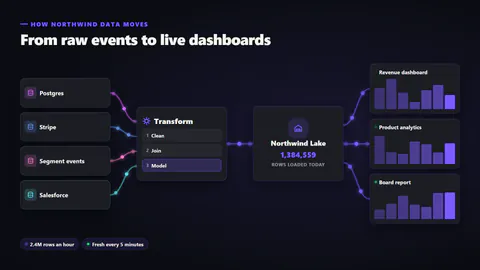
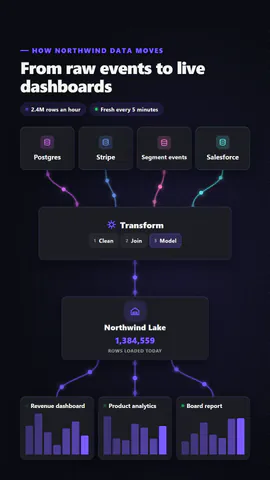
Datenquellen, eine Verarbeitungsstufe, ein Warehouse und Dashboards, verbunden durch Linien, durch die Datenpakete fließen, dabei leuchten Schritte auf und ein Zeilenzähler klettert.
Ideal für: Erklärungen zu Datenplattformen, Integrationen und ETL.
Einstellungen
Schrift
Theme
Größe
Stimmung
Formate, die die Bildprüfung bestanden haben
1:1
Was du schreibst
titleTitle (≤60)· PflichtsourcesWhere the data comes from (≤18)· PflichtprocessThe processing stage (≤18)· PflichtwarehouseWhere it is stored (≤18)· PflichtoutputsWhat reads from it (≤20)· PflichtthroughputA short line about volume (≤24)· PflichtfreshnessA short line about how current it is (≤24)· PflichtkickerSmall line above the title (≤40)stepsSteps inside the processing stage (≤12)orientationAuto flows left to right on wide frames and top to bottom on tall onespacketsDots: glowing points; rows: little table rows travelling the lines after processing
Eine Code-Vorlage: in jedem Tarif kostenlos, ohne KI-Credits.
In einem Film verwenden
Was du ändern kannst:
rushie.props.titlerushie.props.sourcesrushie.props.processrushie.props.warehouserushie.props.outputsrushie.props.throughputrushie.props.freshnessrushie.props (others)Für Entwickler (MCP und JSON)
Das ist genau die Szene für create_animation (MCP): Struktur behalten, Worte ändern und den Sprechertext schreiben — die Stimme bestimmt, wie lange die Szene dauert. Mit set_data in update_storyboard einfügen, um einen fertigen Film zu ändern.
{
  "visual": "rushie",
  "heading": "Data pipeline",
  "narration": "Write the sentence the voice says over this scene; its length is the scene's.",
  "data": {
    "rushie": {
      "template": "data-pipeline",
      "props": {
        "kicker": "How Northwind data moves",
        "title": "From raw events to live dashboards",
        "sources": [
          "Postgres",
          "Stripe",
          "Segment events",
          "Salesforce"
        ],
        "process": "Transform",
        "steps": [
          "Clean",
          "Join",
          "Model"
        ],
        "warehouse": "Northwind Lake",
        "outputs": [
          "Revenue dashboard",
          "Product analytics",
          "Board report"
        ],
        "throughput": "2.4M rows an hour",
        "freshness": "Fresh every 5 minutes",
        "orientation": "auto",
        "packets": "dots"
      }
    }
  }
}