So funktioniert's
Live-Ausgabe der echten Render-Engine — ändere die Einstellungen und sie aktualisiert sich sofort.
RAG-Diagramm
gestaltete motion-karten
Eine Frage fließt in eine Wissensdatenbank, Dokumente werden nach Ähnlichkeit bewertet, die besten fliegen in den Kontext des Modells und eine fundierte Antwort schreibt sich mit Zitat-Chips, als Milchglaskarten oder Bauplan.
Ideal für: Retrieval-Augmented Generation, KI-Suche und „Antworten aus deinen Dokumenten“-Erklärvideos.
Einstellungen
Schrift
Theme
Größe
Stimmung
Formate, die die Bildprüfung bestanden haben
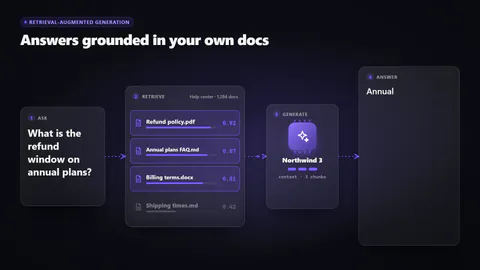
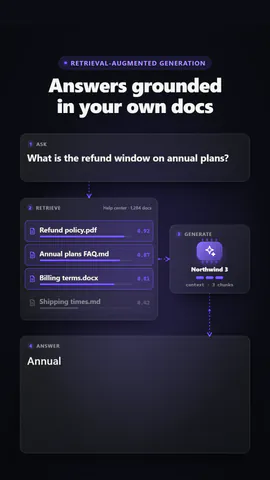
1:1
Was du schreibst
headlineHeadline above the diagram (≤48)· PflichtquestionThe question asked (≤80)· PflichtdocsDocuments searched, with similarity scores· PflichtmodelModel name on the chip (≤18)· PflichtanswerThe answer; write [1], [2] to cite the retrieved documents (≤170)· PflichtkickerSmall line above the headline, or empty to hide (≤32)sourceName of the knowledge base (≤28)topKHow many of the best matches go into the context (≤4)styleFrosted cards with glow, or a line-drawn blueprint
Eine Code-Vorlage: in jedem Tarif kostenlos, ohne KI-Credits.
In einem Film verwenden
Was du ändern kannst:
rushie.props.headlinerushie.props.questionrushie.props.docsrushie.props.modelrushie.props.answerrushie.props (others)Für Entwickler (MCP und JSON)
Das ist genau die Szene für create_animation (MCP): Struktur behalten, Worte ändern und den Sprechertext schreiben — die Stimme bestimmt, wie lange die Szene dauert. Mit set_data in update_storyboard einfügen, um einen fertigen Film zu ändern.
{
  "visual": "rushie",
  "heading": "RAG diagram",
  "narration": "Write the sentence the voice says over this scene; its length is the scene's.",
  "data": {
    "rushie": {
      "template": "rag-diagram",
      "props": {
        "kicker": "Retrieval-augmented generation",
        "headline": "Answers grounded in your own docs",
        "question": "What is the refund window on annual plans?",
        "source": "Help center · 1,284 docs",
        "docs": [
          {
            "title": "Refund policy.pdf",
            "score": 0.92
          },
          {
            "title": "Annual plans FAQ.md",
            "score": 0.87
          },
          {
            "title": "Billing terms.docx",
            "score": 0.81
          },
          {
            "title": "Shipping times.md",
            "score": 0.42
          }
        ],
        "topK": 3,
        "model": "Northwind 3",
        "answer": "Annual plans can be refunded in full within 30 days of purchase [1], and pro-rated after that until day 90 [2].",
        "style": "glass"
      }
    }
  }
}