So funktioniert's
Live-Ausgabe der echten Render-Engine — ändere die Einstellungen und sie aktualisiert sich sofort.
Agenten-Workflow
gestaltete motion-karten
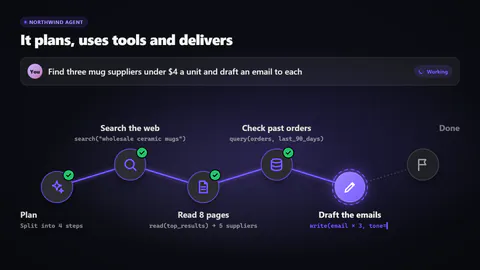
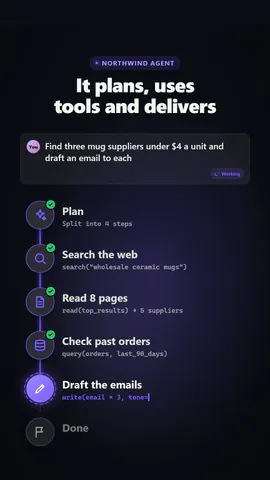
Ein KI-Agent übernimmt eine Aufgabe, plant sie und ruft dann seine Tools nacheinander auf (Suchen, Lesen, Abfragen, Schreiben), jeder Knoten leuchtet mit dem darunter getippten Tool-Aufruf auf und ein Signal läuft zum nächsten, bis ein Ergebnis zurückgegeben wird; als Knotenfluss oder Run-Log.
Ideal für: KI-Agenten, Automatisierung und agentische Produktdemos.
Einstellungen
Schrift
Theme
Größe
Stimmung
Formate, die die Bildprüfung bestanden haben
1:1
Was du schreibst
headlineHeadline above (or beside) the workflow (≤48)· PflichtgoalThe task the person gives the agent (≤100)· PflichtplanWhat the planning step shows (≤40)· PflichtstepsThe tool calls, in order· PflichtresultWhat the agent hands back at the end (≤48)· PflichtkickerSmall line above the headline, or empty to hide (≤28)layoutA flow of glowing tool nodes, or a run log with each call ticking off
Eine Code-Vorlage: in jedem Tarif kostenlos, ohne KI-Credits.
In einem Film verwenden
Was du ändern kannst:
rushie.props.headlinerushie.props.goalrushie.props.planrushie.props.stepsrushie.props.resultrushie.props (others)Für Entwickler (MCP und JSON)
Das ist genau die Szene für create_animation (MCP): Struktur behalten, Worte ändern und den Sprechertext schreiben — die Stimme bestimmt, wie lange die Szene dauert. Mit set_data in update_storyboard einfügen, um einen fertigen Film zu ändern.
{
  "visual": "rushie",
  "heading": "Agent workflow",
  "narration": "Write the sentence the voice says over this scene; its length is the scene's.",
  "data": {
    "rushie": {
      "template": "agent-workflow",
      "props": {
        "kicker": "Northwind Agent",
        "headline": "It plans, uses tools and delivers",
        "goal": "Find three mug suppliers under $4 a unit and draft an email to each",
        "plan": "Split into 4 steps",
        "steps": [
          {
            "tool": "search",
            "label": "Search the web",
            "detail": "search(\"wholesale ceramic mugs\")"
          },
          {
            "tool": "read",
            "label": "Read 8 pages",
            "detail": "read(top_results) → 5 suppliers"
          },
          {
            "tool": "database",
            "label": "Check past orders",
            "detail": "query(orders, last_90_days)"
          },
          {
            "tool": "write",
            "label": "Draft the emails",
            "detail": "write(email × 3, tone=friendly)"
          }
        ],
        "result": "3 drafts ready for your review",
        "layout": "graph"
      }
    }
  }
}