Datos y ROI
Salida en vivo del motor de render real — edita los ajustes y se actualiza al instante.
Diagrama de Sankey
tarjetas animadas de diseño
Etapas unidas por cintas cuyo ancho corresponde a las cantidades que fluyen entre ellas, reveladas etapa a etapa de izquierda a derecha (o de arriba abajo en un móvil).
Ideal para: cuentas de resultados, presupuestos, recorridos de usuario y adónde va todo.
Ajustes
Fuente
Tema
Tamaño
Ánimo
Formatos que pasaron el control de imagen
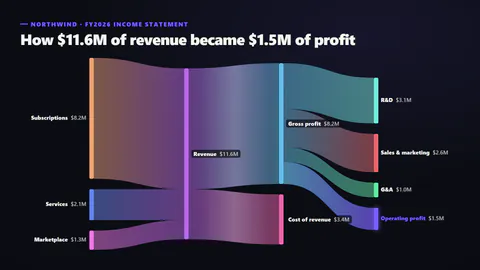
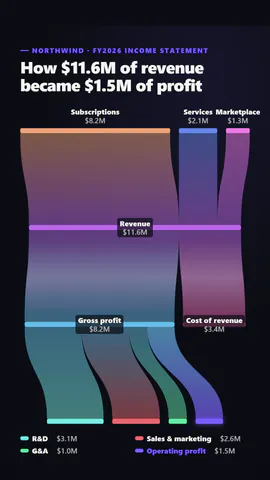
Lo que escribes
titleTitle (≤60)· obligatoriolinksThe flows: from one named stage to another, with the amount; stages are placed in columns by how far along they are· obligatoriohighlightThe stage to make the hero (glows, and in focus mode is the only one in colour) (≤22)· obligatoriokickerSmall line above the title (≤40)prefixBefore each amount, like $ (≤3)suffixAfter each amount, like M or % (≤4)decimalsDecimal places (≤2)orientationAuto flows left to right on wide frames and top to bottom on tall onesribbonStyleRibbons blending from one stage's colour to the next, or in the colour they leavepaletteSpectrum: each stage its own colour; focus: all muted but the highlighted stage and its flows
Una plantilla en código: gratis en todos los planes, sin créditos de IA.
Úsala en un vídeo
Ideal paraCifras y resultados
Lo que puedes cambiar:
rushie.props.titlerushie.props.linksrushie.props.highlightrushie.props (others)Para desarrolladores (MCP y JSON)
Esta es la escena exacta para enviar a create_animation (MCP): mantén la estructura, cambia las palabras y escribe la narración — la voz fija cuánto dura la escena. Pégala en update_storyboard con set_data para cambiar un vídeo que ya hiciste.
{
  "visual": "rushie",
  "heading": "Sankey flow",
  "narration": "Write the sentence the voice says over this scene; its length is the scene's.",
  "data": {
    "rushie": {
      "template": "sankey-flow",
      "props": {
        "kicker": "Northwind · FY2026 income statement",
        "title": "How $11.6M of revenue became $1.5M of profit",
        "links": [
          {
            "from": "Subscriptions",
            "to": "Revenue",
            "value": 8.2
          },
          {
            "from": "Services",
            "to": "Revenue",
            "value": 2.1
          },
          {
            "from": "Marketplace",
            "to": "Revenue",
            "value": 1.3
          },
          {
            "from": "Revenue",
            "to": "Gross profit",
            "value": 8.2
          },
          {
            "from": "Revenue",
            "to": "Cost of revenue",
            "value": 3.4
          },
          {
            "from": "Gross profit",
            "to": "R&D",
            "value": 3.1
          },
          {
            "from": "Gross profit",
            "to": "Sales & marketing",
            "value": 2.6
          },
          {
            "from": "Gross profit",
            "to": "G&A",
            "value": 1
          },
          {
            "from": "Gross profit",
            "to": "Operating profit",
            "value": 1.5
          }
        ],
        "prefix": "$",
        "suffix": "M",
        "decimals": 1,
        "highlight": "Operating profit",
        "orientation": "auto",
        "ribbonStyle": "gradient",
        "palette": "spectrum"
      }
    }
  }
}