Cómo funciona
Salida en vivo del motor de render real — edita los ajustes y se actualiza al instante.
Pipeline de datos
tarjetas animadas de diseño
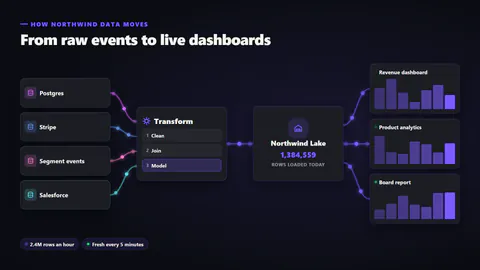
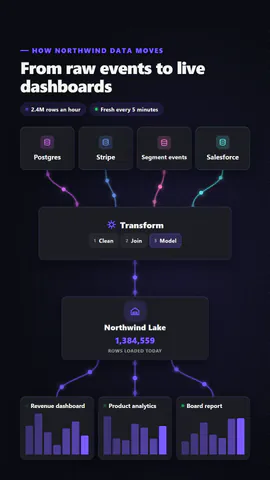
Fuentes de datos, una etapa de procesamiento, un almacén y paneles unidos por líneas por las que fluyen paquetes de datos, con pasos que se iluminan y un contador de filas que sube.
Ideal para: explicar plataformas de datos, integraciones y ETL.
Ajustes
Fuente
Tema
Tamaño
Ánimo
Formatos que pasaron el control de imagen
1:1
Lo que escribes
titleTitle (≤60)· obligatoriosourcesWhere the data comes from (≤18)· obligatorioprocessThe processing stage (≤18)· obligatoriowarehouseWhere it is stored (≤18)· obligatoriooutputsWhat reads from it (≤20)· obligatoriothroughputA short line about volume (≤24)· obligatoriofreshnessA short line about how current it is (≤24)· obligatoriokickerSmall line above the title (≤40)stepsSteps inside the processing stage (≤12)orientationAuto flows left to right on wide frames and top to bottom on tall onespacketsDots: glowing points; rows: little table rows travelling the lines after processing
Una plantilla en código: gratis en todos los planes, sin créditos de IA.
Úsala en un vídeo
Lo que puedes cambiar:
rushie.props.titlerushie.props.sourcesrushie.props.processrushie.props.warehouserushie.props.outputsrushie.props.throughputrushie.props.freshnessrushie.props (others)Para desarrolladores (MCP y JSON)
Esta es la escena exacta para enviar a create_animation (MCP): mantén la estructura, cambia las palabras y escribe la narración — la voz fija cuánto dura la escena. Pégala en update_storyboard con set_data para cambiar un vídeo que ya hiciste.
{
  "visual": "rushie",
  "heading": "Data pipeline",
  "narration": "Write the sentence the voice says over this scene; its length is the scene's.",
  "data": {
    "rushie": {
      "template": "data-pipeline",
      "props": {
        "kicker": "How Northwind data moves",
        "title": "From raw events to live dashboards",
        "sources": [
          "Postgres",
          "Stripe",
          "Segment events",
          "Salesforce"
        ],
        "process": "Transform",
        "steps": [
          "Clean",
          "Join",
          "Model"
        ],
        "warehouse": "Northwind Lake",
        "outputs": [
          "Revenue dashboard",
          "Product analytics",
          "Board report"
        ],
        "throughput": "2.4M rows an hour",
        "freshness": "Fresh every 5 minutes",
        "orientation": "auto",
        "packets": "dots"
      }
    }
  }
}