Data & ROI
Live output of the real render engine — edit the settings and it updates instantly.
Sankey flow
designed motion cards
Stages joined by ribbons whose widths match the amounts flowing between them, revealed stage by stage left to right (or top to bottom on a phone).
Best for: Income statements, budgets, user journeys and where things go.
Settings
Font
Theme
Size
Mood
Shapes it passed the frame check in
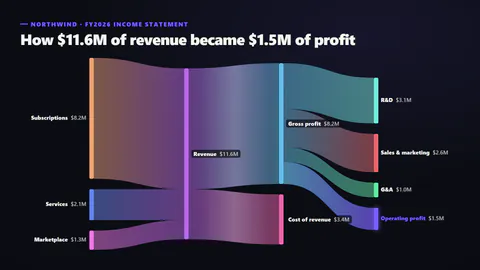
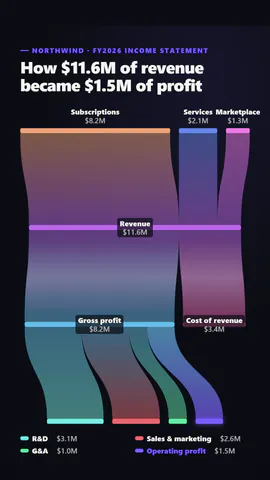
What you write
titleTitle (≤60)· requiredlinksThe flows: from one named stage to another, with the amount; stages are placed in columns by how far along they are· requiredhighlightThe stage to make the hero (glows, and in focus mode is the only one in colour) (≤22)· requiredkickerSmall line above the title (≤40)prefixBefore each amount, like $ (≤3)suffixAfter each amount, like M or % (≤4)decimalsDecimal places (≤2)orientationAuto flows left to right on wide frames and top to bottom on tall onesribbonStyleRibbons blending from one stage's colour to the next, or in the colour they leavepaletteSpectrum: each stage its own colour; focus: all muted but the highlighted stage and its flows
A code template: free on every plan, no AI credits.
Use it in a film
Made forStats & results
What you can change:
rushie.props.titlerushie.props.linksrushie.props.highlightrushie.props (others)For developers (MCP and JSON)
This is the exact scene to send to create_animation (MCP): keep the shape, change the words, and write the narration — the voice sets how long the scene lasts. Paste it into update_storyboard with set_data to change a film you already made.
{
  "visual": "rushie",
  "heading": "Sankey flow",
  "narration": "Write the sentence the voice says over this scene; its length is the scene's.",
  "data": {
    "rushie": {
      "template": "sankey-flow",
      "props": {
        "kicker": "Northwind · FY2026 income statement",
        "title": "How $11.6M of revenue became $1.5M of profit",
        "links": [
          {
            "from": "Subscriptions",
            "to": "Revenue",
            "value": 8.2
          },
          {
            "from": "Services",
            "to": "Revenue",
            "value": 2.1
          },
          {
            "from": "Marketplace",
            "to": "Revenue",
            "value": 1.3
          },
          {
            "from": "Revenue",
            "to": "Gross profit",
            "value": 8.2
          },
          {
            "from": "Revenue",
            "to": "Cost of revenue",
            "value": 3.4
          },
          {
            "from": "Gross profit",
            "to": "R&D",
            "value": 3.1
          },
          {
            "from": "Gross profit",
            "to": "Sales & marketing",
            "value": 2.6
          },
          {
            "from": "Gross profit",
            "to": "G&A",
            "value": 1
          },
          {
            "from": "Gross profit",
            "to": "Operating profit",
            "value": 1.5
          }
        ],
        "prefix": "$",
        "suffix": "M",
        "decimals": 1,
        "highlight": "Operating profit",
        "orientation": "auto",
        "ribbonStyle": "gradient",
        "palette": "spectrum"
      }
    }
  }
}