Presenter
A presenter in the corner, over the real screencast
The way good tutorials are shot: your product fills the frame and a person in the corner talks about it. PageToVid generates the presenter as a clip and draws it over the scene — the recording keeps playing underneath.
Paid plans, from Starter
How it works
- 01Create a character
Optional, and worth it: a named character keeps the same presenter in every scene.
- 02Put a presenter on a scene
Describe the shot. A line in quotation marks is said out loud by the presenter.
- 03Leave the corner to PageToVid
Name no corner and the one clear of the scene's subject is chosen — the button being clicked, the field being typed into — before the camera zooms and where it settles.
- 04Render
The presenter is one clip, charged once and reused free afterwards. Moving, resizing or reshaping it later never makes a new one.
The settings
- corner
- bottom-right, bottom-left, top-right or top-left. Leave it out and the corner is chosen for you. A corner you name is kept even if it covers the subject, and the render report says so.
- shape
- rounded keeps the whole clip; circle crops to a talking head and needs a close-up; square is editorial.
- size
- Width as a share of the frame, from 14% to 42%; 26% by default. Out of range is adjusted, never refused.
- mute
- The face without the voice.
- character
- A character's name, so the same person appears in every scene.
- model
- Which model makes the clip. Leave it out for the house clip.
update_storyboard
  set_inset  scene 2
    character: "Sam"
    generate:  "Sam at his desk, talking to camera.
                He says: \"Step one: paste a link.\""
    shape:     circle
    size:      0.28
Who speaks when
In a scene with no narration, the presenter carries it: their voice plays at full volume and the scene holds until their last word. In a narrated scene, the presenter's sound drops to a quiet bed under the narrator. Set mute to keep the face and drop the voice.
What the layout guarantees
- Inside the frame, in every aspect ratio and at any size.
- Clear of the captions, even when a caption is lifted above a low subject.
- Clear of the watermark badge when a film has one.
- Never stretched: a circle crops a square, so a face is never squeezed.
- Never cut off mid-sentence in a scene without narration.
How to ask for it
Today a presenter is added through an AI assistant connected to PageToVid over MCP — Claude, ChatGPT, Cursor, the VS Code extension — with the set_inset operation of update_storyboard. You can just ask in plain words: "put Sam in the corner of scene 2, saying: step one, paste a link". The web editor shows and keeps a presenter, but has no control to add one yet.
A real example
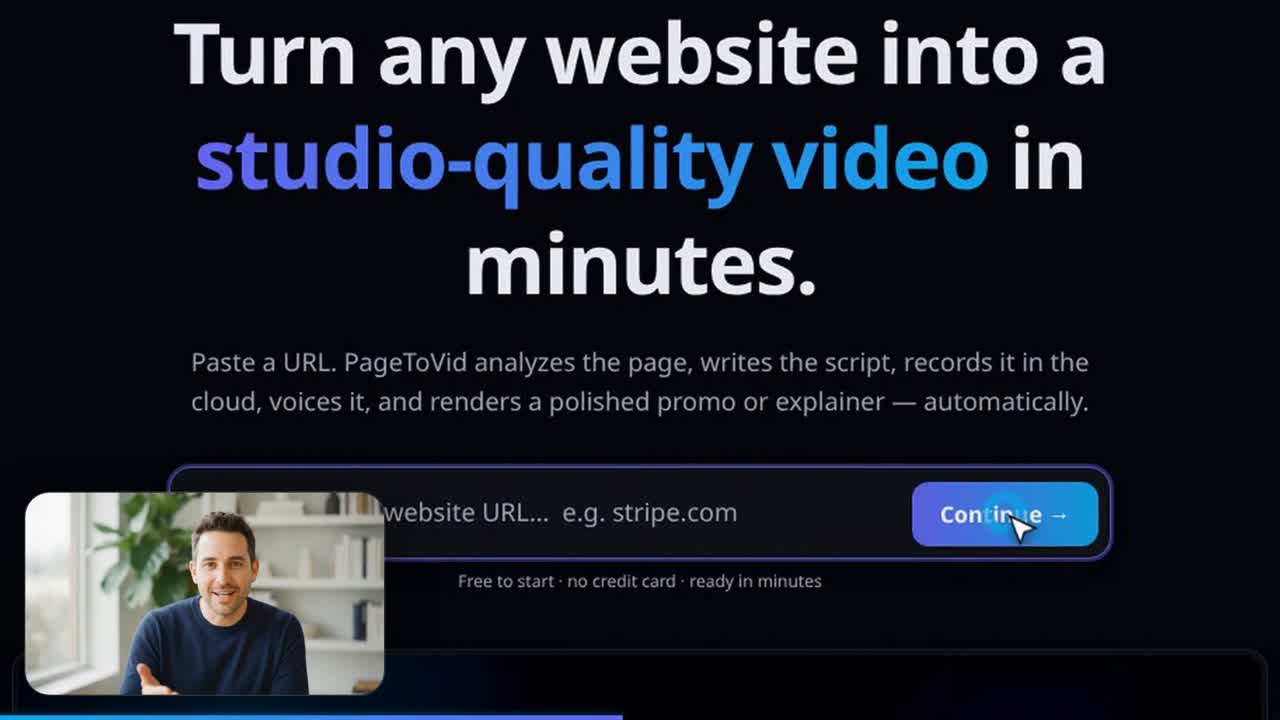
A click scene from the same film: the cursor on the real Continue button, the presenter in the opposite corner.
What it costs
A presenter is one clip per scene, charged at its model's price when it is generated and refunded if it fails. With no model named it is the house clip, 160 credits. For a presenter, PageToVid asks for the model's cheapest resolution — at a quarter of the frame the difference never shows. Changing the corner, size or shape afterwards is free.
Frequently asked questions
Can I add a presenter from the web editor?
Not yet. The editor previews and keeps a presenter, but adding one is done through an AI assistant connected over MCP, with update_storyboard's set_inset operation. Asking in plain words is enough.
Will the presenter cover the button being clicked?
Not if you leave the corner to PageToVid. It picks the corner that keeps clear of the scene's subject both before the camera moves and where it settles. A corner you choose yourself is honoured, and the render report tells you if it covers the subject.
Whose voice is it?
The line you write in quotation marks is voiced by the video model, with lips to match. The film's narrator stays its text-to-speech voice; in a narrated scene the presenter drops to a bed underneath.
Can the presenter stay silent?
Yes. Set mute and the presenter appears without sound — useful when the narration carries the whole script.
Does it work in vertical films?
Yes. The layout is computed for every aspect ratio, with margins that scale with the frame, so a 9:16 film and a 16:9 film look equally balanced.
Is it on the free plan?
No. The presenter is a generated clip, and AI generation is included from the Starter plan.
More than screencasts
AI clips & B-roll
Generated video scenes from Veo 3.1, Seedance, Wan or MiniMax, cut between real recordings of your site. One model per scene, priced in credits.
Consistent characters
Create a person, mascot or product once from reference images. Every clip that names it keeps the same face, across scenes and films.
Start with your website
Every film starts from a URL and real footage of your site. Add clips, characters and a presenter where they earn their place.