Données et ROI
Sortie en direct du vrai moteur de rendu — modifiez les réglages et elle se met à jour instantanément.
Diagramme de Sankey
cartes animées design
Des étapes reliées par des rubans dont la largeur correspond aux quantités qui circulent, révélées étape par étape de gauche à droite (ou de haut en bas sur téléphone).
Idéal pour : comptes de résultat, budgets, parcours utilisateurs et « où va l'argent ».
Réglages
Police
Thème
Taille
Humeur
Formats validés par le contrôle d'image
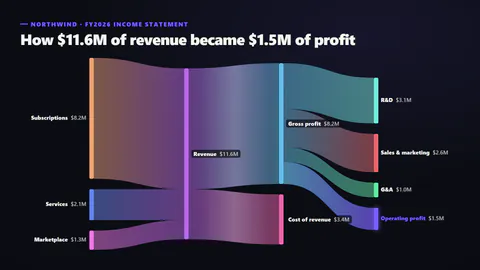
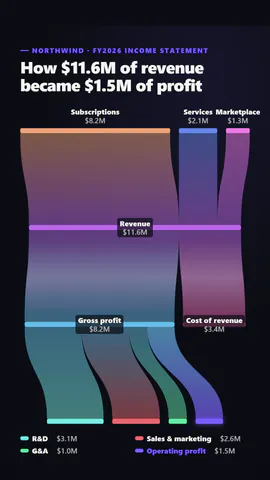
Ce que vous écrivez
titleTitle (≤60)· obligatoirelinksThe flows: from one named stage to another, with the amount; stages are placed in columns by how far along they are· obligatoirehighlightThe stage to make the hero (glows, and in focus mode is the only one in colour) (≤22)· obligatoirekickerSmall line above the title (≤40)prefixBefore each amount, like $ (≤3)suffixAfter each amount, like M or % (≤4)decimalsDecimal places (≤2)orientationAuto flows left to right on wide frames and top to bottom on tall onesribbonStyleRibbons blending from one stage's colour to the next, or in the colour they leavepaletteSpectrum: each stage its own colour; focus: all muted but the highlighted stage and its flows
Un modèle en code : gratuit sur toutes les offres, sans crédits IA.
L'utiliser dans un film
Idéal pourChiffres & résultats
Ce que vous pouvez changer :
rushie.props.titlerushie.props.linksrushie.props.highlightrushie.props (others)Pour les développeurs (MCP et JSON)
Voici la scène exacte à envoyer à create_animation (MCP) : gardez la structure, changez les mots et écrivez la narration — c'est la voix qui fixe la durée de la scène. Collez-la dans update_storyboard avec set_data pour modifier un film déjà fait.
{
  "visual": "rushie",
  "heading": "Sankey flow",
  "narration": "Write the sentence the voice says over this scene; its length is the scene's.",
  "data": {
    "rushie": {
      "template": "sankey-flow",
      "props": {
        "kicker": "Northwind · FY2026 income statement",
        "title": "How $11.6M of revenue became $1.5M of profit",
        "links": [
          {
            "from": "Subscriptions",
            "to": "Revenue",
            "value": 8.2
          },
          {
            "from": "Services",
            "to": "Revenue",
            "value": 2.1
          },
          {
            "from": "Marketplace",
            "to": "Revenue",
            "value": 1.3
          },
          {
            "from": "Revenue",
            "to": "Gross profit",
            "value": 8.2
          },
          {
            "from": "Revenue",
            "to": "Cost of revenue",
            "value": 3.4
          },
          {
            "from": "Gross profit",
            "to": "R&D",
            "value": 3.1
          },
          {
            "from": "Gross profit",
            "to": "Sales & marketing",
            "value": 2.6
          },
          {
            "from": "Gross profit",
            "to": "G&A",
            "value": 1
          },
          {
            "from": "Gross profit",
            "to": "Operating profit",
            "value": 1.5
          }
        ],
        "prefix": "$",
        "suffix": "M",
        "decimals": 1,
        "highlight": "Operating profit",
        "orientation": "auto",
        "ribbonStyle": "gradient",
        "palette": "spectrum"
      }
    }
  }
}